Trick: Change the progress bar in Safari
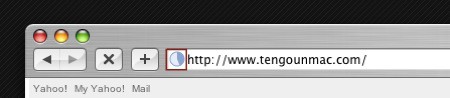
Before trying this trick, I recommend that you update Safari to Beta version 3.0.3, which came out a couple of days ago, since the previous version contained some bugs.
If you look at the screenshot I have included, you will be able to see a pie chart to the left of the URL of the web page being loaded (I have boxed it so you can see it better). This chart replaces the progress bar that Safari has accustomed us to (a blue bar that grows larger as the page loads).
Macworld’s website has included a video that shows the difference. You can take a look at it before attempting the change.
To make this change, you have to reopen the Terminal application and type the following:
defaults write com.apple.Safari DebugUsePieProgressIndicator -bool true
Once this is done, restart Safari and you will see how your progress bar has turned into a pie chart.
If you want to put things back the way they were, reopen Terminal and replace true with false.
Via Macworld




3 comments · Comment
3 comments
Personalmente, me gusta la barra de progreso tal como esta, pero creo que el gráfico circular de progreso sería bastante útil dentro de cada pestaña, así podríamos ver el progreso de un sitio web, estando en otra pestaña…
Saludos desde Chile
En Leopard también funciona, en cambio el “truco” de los extras de desarrollo esta mucho más logrado en la versión de Safari que tiene Leopard, subo un par de imágenes, es una herramienta muy útil.
http://jotapeges.greenshines.com/pfiles/3443/webkit1.jpeg
http://jotapeges.greenshines.com/pfiles/3444/webkit2.jpeg
Saludos!
En Leopard también funciona, en cambio el “truco” de los extras de desarrollo esta mucho más logrado en la versión de Safari que tiene Leopard, subo un par de imágenes, es una herramienta muy útil.
http://jotapeges.greenshines.com/pfiles/3443/webkit1.jpeg
http://jotapeges.greenshines.com/pfiles/3444/webkit2.jpeg