Deeper, or how to enable hidden features in Mac OS X
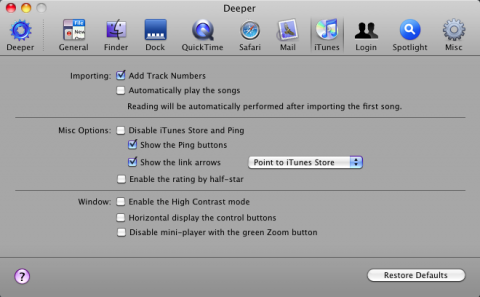
Some of you may know or use an application called Onyx. This tool is developed by Titanium Software and is widely known as a reliable solution for maintaining and optimizing our system. Well, Deeper is another application created by Titanium Software that gives us the possibility to tweak several of the system’s hidden options.
If you remember, a few days ago I told you about Secrets, a preference pane from which we can modify the hidden options of several applications available for Mac OS X. Deeper offers something very similar, except that it focuses exclusively on the applications included with the system, such as Finder, iTunes, Spotlight, etc.
With Deeper we can enable or disable dozens of hidden options in applications and services such as Finder, Dock, QuickTime, Safari, Mail, iTunes, and Spotlight, as well as alter other, more general options. An example of the possibilities offered is that thanks to Deeper we have the chance to enable the “suck” effect, or Suck Effect, of the Dock, or disable certain iTunes options such as Ping and the iTunes Store; and, just like these, there are many more options to modify.
Deeper is a free tool and is compatible with Tiger, Leopard and Snow Leopard, although for obvious reasons the version for Mac OS X 10.6 is the most up to date.
Download | Deeper 1.2.9
Via | Mac OS X Freeware