Possible Improvements for iOS's New Notification Center
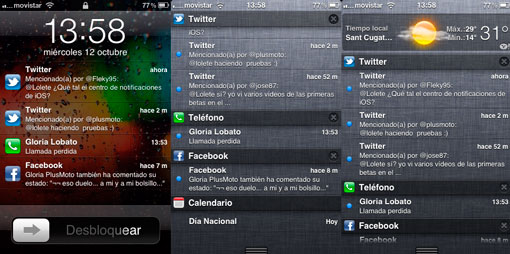
There is no doubt that the new iOS Notification Center is one of the most anticipated features in this new version of the operating system. We have had to wait until version 5 of the operating system to see a clear improvement, but the wait has been worth it. Many criticize the new Notification Center as nothing more than a copy of what we can find on any Android device since its beginnings, and in part this may be true, although I say in part because Apple’s development has gone a bit further and allows configuring certain options that is not possible on Android, at least for now. In any case, this is not the topic of this post; rather, I want to give my point of view on what things could be included in future versions of iOS to keep improving the notification system.
Now we have a way to view the dozens of notifications that many of us receive every day: Twitter, Facebook, missed calls, SMS, WhatsApp, email, Calendar… Many of the apps available on iOS allow us to receive notifications for certain things, always depending on our settings, although unfortunately not everything is configurable. Since the arrival of push notifications on iOS, it has always been possible to disable notifications completely by simply sliding a button; with iOS 5 this is no longer possible and we have to turn notifications on or off one by one to our liking. That is why I want to set out in these lines my ideas so that the Notification Center keeps improving.
The first would be a quick and simple way to disable all notifications with a single “click”. The way we had before with iOS was perfect and I hope that future revisions of the Notification Center bring back this option, although we could go a bit further. Perhaps Apple could consider adding the possibility of “scheduling” notifications, that is, letting the user decide between which hours push notifications should be active and which not. For example, we could set them to be active from 8:00 in the morning until midnight and completely disabled during the night, sparing us scares during our rest hours. Wouldn’t that be interesting?

On the other hand, it would also be interesting to have some function to automatically disable notifications when we are near our computer. This would be entirely configurable by the user, although here it is no longer just a software matter. Perhaps Apple could take advantage of NFC technology to make something like this work, and for that it would be necessary to include chips of this type in future iPhones as well as Macs (and PCs) for such a system to function. But perhaps this is asking for the moon, and many of you probably don’t consider it important for notifications to be disabled when we are near the computer, although I find it really annoying to receive Twitter notifications when, for example, I have the client open on the computer.
These are some of the ideas that come to mind when I think about how Apple’s Notification Center could be improved, which ultimately boil down to different ways of disabling them in certain circumstances —what an irony!—. Of course there are other things that could be improvements, but in my opinion they are not as important: greater customization, other ways of viewing them, more information in the notification, a way to delete only certain specific notifications (right now it only allows, for example, deleting all Twitter notifications, but not a single one), etc., etc… The list is long and everyone will have their own ideas. What are yours?
4 comments · Comment
4 comments
Me encanta el fondo de pantalla de la primera imagen, ¿podrías decírme dónde conseguirlo?. Gracias.
Aquí te lo dejo 😀
http://dl.dropbox.com/u/1547478/Foto%2006-10-11%2012%2011%2052.jpg
cuando sale ya el ios5 segun se es hoy